Set up a host in one step
On Ubuntu or Debian, setup installs QEMU/KVM, libvirt, UEFI firmware, a software TPM, noVNC and websockify. It also starts the libvirt default NAT network and creates a VMRelay image pool.
Apache licensed and free for commercial use.
VMRelay is a free terminal app for creating, importing and managing KVM virtual machines on an ordinary Ubuntu or Debian server, over SSH. Open VM consoles in your browser without exposing VNC or libvirt to the network.
Sometimes you just need a few virtual machines: a Windows build to test an installer, an old server image to reproduce a fault, or a clean Linux machine to try a configuration change. A full virtualisation platform can be more than that job needs, and a web-based hypervisor console is one more service to secure.
VMRelay works through the SSH access you already have. It prepares the host, then lets you create, import and run VMs from a keyboard-driven terminal interface on your own workstation.
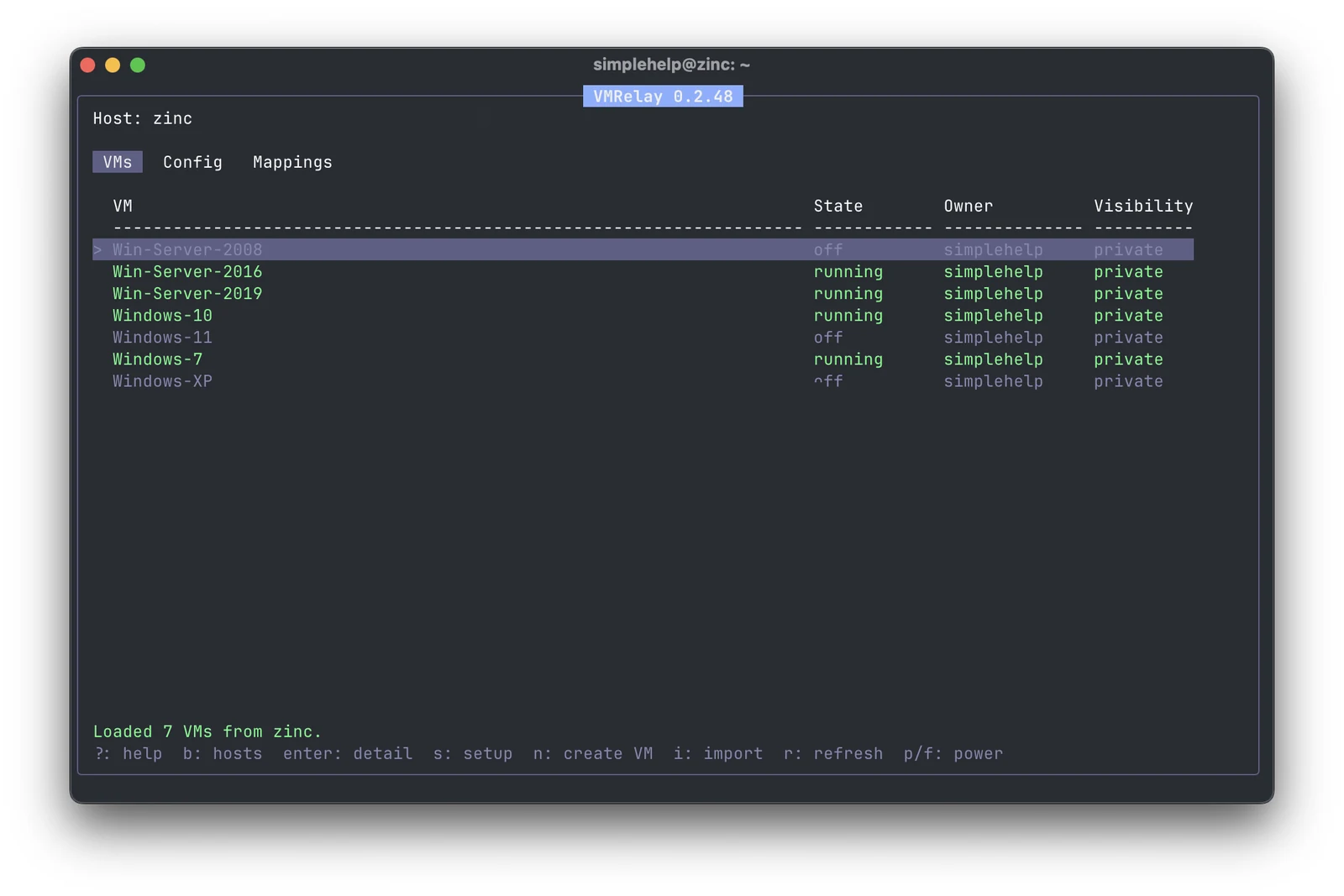
On Ubuntu or Debian, setup installs QEMU/KVM, libvirt, UEFI firmware, a software TPM, noVNC and websockify. It also starts the libvirt default NAT network and creates a VMRelay image pool.
New VMs use qcow2 disks, NAT networking, an e1000e network adapter and USB tablet input. Choose BIOS or UEFI, with Secure Boot and TPM 2.0 when you select UEFI. Browse ISO files on the host from the create wizard.
Import VirtualBox .vbox and VMware .vmx machines, or .vdi and .vmdk disks. VMRelay copies and converts disks to qcow2 and leaves the source files untouched.
Each console runs through noVNC on the host's loopback interface, reached through an SSH tunnel from your workstation. Nothing is published on the host's public interfaces.
Service mappings forward a port on the VM-facing libvirt bridge back to a service on your workstation, such as a development web server, through a reverse SSH tunnel.
Create, import, convert and detach disks, set boot priority, attach network adapters and change CPU and memory. Mark VMs as private or shared with other VMRelay users on the host.
You need:
sudo, to run setup.Run this on your workstation:
curl -fsSL https://tools.simplehelp.io/vmrelay/install.sh | bashThe installer downloads the package for your platform from tools.simplehelp.io, verifies its pinned SHA-256 checksum and installs vmrelay to /usr/local/bin, asking for sudo if it needs to. Set VMRELAY_INSTALL_DIR to install somewhere else. For manual installation, download a package and the matching checksums below.
VMRelay 0.2.53 downloads:
VMRelay checks for new releases when it starts. Updates and host setup leave the terminal app first, so sudo prompts work normally.
vmrelay.a to add a host, for example [email protected].t to test SSH, libvirt, KVM, noVNC and websockify on the host.Enter to open the host.n to create a VM, or i to import one.Enter on a VM for its Summary, Disks, NICs and Actions.Press ? at any time for help, and m to change the colour theme. To stop VMRelay opening your browser automatically, run VMRELAY_OPEN_BROWSER=0 vmrelay.
VMRelay manages the host over SSH and does not expose libvirt, noVNC or websockify on the public network. Console listeners bind only to loopback and are reached through SSH local forwards. Service mappings expose a relay only on the libvirt bridge that guests use, not on the host's public interfaces.
VMs run under system libvirt at qemu:///system. Private and shared visibility is VMRelay metadata for its own interface. It is not a security boundary for users who also have broad sudo or libvirt access on the host.
Yes. VMRelay is Apache licensed and free for commercial use, and its source code is published on GitHub.
No. VMRelay is a standalone tool and does not need a SimpleHelp server or licence.
VMRelay sets up and manages Ubuntu and Debian hosts with KVM hardware virtualisation, over SSH. Setup needs an account that can use sudo.
VMRelay can create UEFI virtual machines with Secure Boot and TPM 2.0, which Windows 11 requires. You supply your own Windows installation media and licence.
Yes. VMRelay imports .vbox and .vmx machines and .vdi and .vmdk disks, converts the disks to qcow2 and leaves the original files untouched.
No. Consoles listen only on the host's loopback interface and are reached through an SSH tunnel from your workstation.
Manage KVM virtual machines on an existing Ubuntu or Debian server from macOS or Linux. Use VMRelay over SSH, with browser consoles and no web admin port.
Read guideCreate Windows 11 test VMs on a remote Linux server with VMRelay. Configure UEFI, Secure Boot and TPM 2.0, then test installers through an SSH browser console.
Read guideMove VirtualBox and VMware test VMs to KVM with VMRelay. Import VBOX, VMX, VDI or VMDK files, convert disks to qcow2 and check boot, drivers and networking.
Read guideUse VMRelay and agent-sudo to run trusted AI agents in disposable Ubuntu VMs. Keep root grants in the guest and review network access, data and cleanup.
Read guideGive a trusted AI agent time-limited root access on Ubuntu, without sharing your administrator password.
ExploreManage headless Linux and Windows servers without exposing SSH or RDP. Terminal, file transfer, monitoring and scripting through your own SimpleHelp server.
ExploreRemote desktop, terminal and file transfer for Linux machines, from the same console as Windows and Mac, on your own server.
ExploreSimpleHelp gives you remote support, access, monitoring and automation for Windows, macOS and Linux, on a server you control. Every feature, free for 30 days.
Start Free Trial

