Remote Support for
Mobile Devices

SimpleHelp 5.3.8 and later
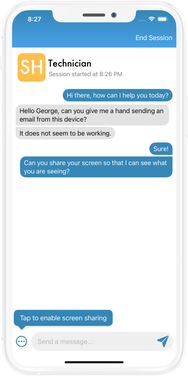
SimpleHelp includes the ability to support mobile iOS and Android devices, using the SimpleHelp Remote Support app. You can download the app on a mobile device by navigating to your SimpleHelp server address, or by downloading the application using one of the links below.


The SimpleHelp Remote Support app is a Remote Support client that allows mobile devices to establish a Support session, similar to the desktop Remote Support application. Features of the app include:
- Connection Codes - give your customers a six digit connection code to easily connect to your SimpleHelp server. Customers will see your branding and company name when they confirm the connection. If customers don't have a connection code they can still connect using your server's URL instead.
- Chat - send chat messages to technicians, and get notifications of responses when the app is not visible.
- Share Screen and Pictures - share the mobile device screen so that the technician can see what you are seeing, or alternatively send them a screenshot or photo to better illustrate the issue you are having.
- Reconnect - the Remote Support app will remember the support service you connect to, to easily enable you to get support in the future without needing to re-enter the connection code.


