Security Product Interference and Update Anxiety in SimpleHelp
Why security tools can flag SimpleHelp after an update, and steps to consider first, like checking with your security vendor and testing on a non-production server.


Kimanni Bramble
Why security tools can flag SimpleHelp after an update, and steps to consider first, like checking with your security vendor and testing on a non-production server.
Most SimpleHelp problems that cost admins sleep come from two fears: security tools blocking SimpleHelp (security product interference), and updates breaking what already works (update anxiety). We aren't security experts, so this post isn't a set of instructions. It explains why the issue happens and suggests steps worth considering before you update.
Remote access tools behave a lot like attackers' tools. They run a persistent service, control the screen, move files and run commands, so security products are right to look at them closely.
SimpleHelp faces an extra hurdle that tools like TeamViewer don't. TeamViewer gives everyone the same client, which connects to TeamViewer's own address. Security vendors see that identical file millions of times and learn to trust it.
SimpleHelp is self-hosted, so each client is built with your own server's URL inside it. Your client is unique to you, and every update changes its hash. To a security product, it can look like a brand-new, unfamiliar file after each update.
It rarely announces itself.
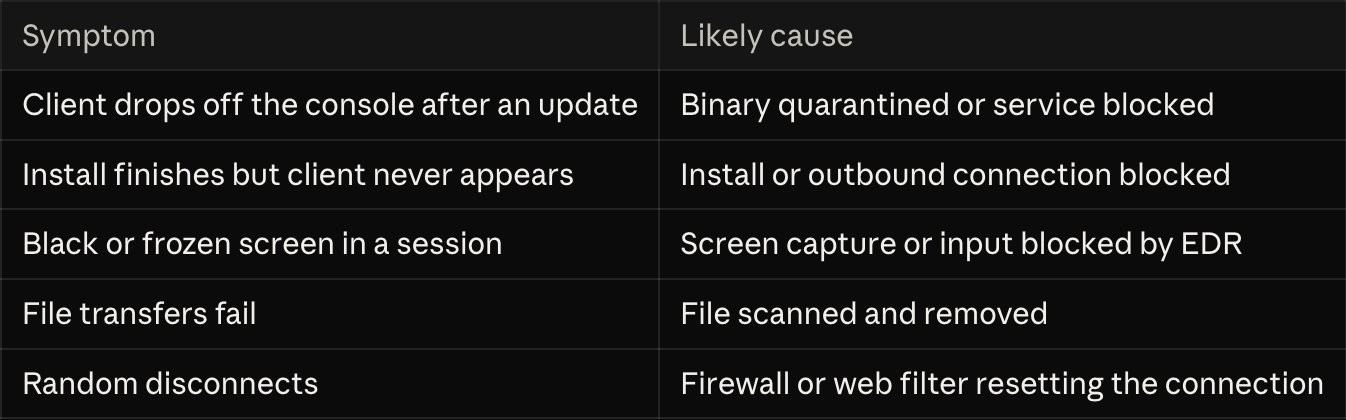
Putting off updates is understandable, but a remote access server is a valuable target, and updates often carry security fixes.
These are suggestions, not a security policy. Your security vendor or IT security team is best placed to advise on your setup.
Security products flagging SimpleHelp is a known side effect of self-hosted remote access, not a sign that something is wrong. A little preparation before each update, such as checking with your security vendor and testing away from production, can make updates far less stressful. When in doubt, your security vendor is the best source of advice for your environment.


