
SimpleHelp License Changes
SimpleHelp 6.0 introduces changes to how SimpleHelp servers retrieve a license. Before upgrading please review the Licensing Guide for more information.
What's New in SimpleHelp 6.0
SimpleHelp 6.0 is a new major release of SimpleHelp and includes a large number of changes and improvements across the product. On this page we've covered some of the main changes up front, but have listed many more changes below.
As always, we greatly value your feedback and support. If you have any comments or queries please get in touch.
As always, we greatly value your feedback and support. If you have any comments or queries please get in touch.
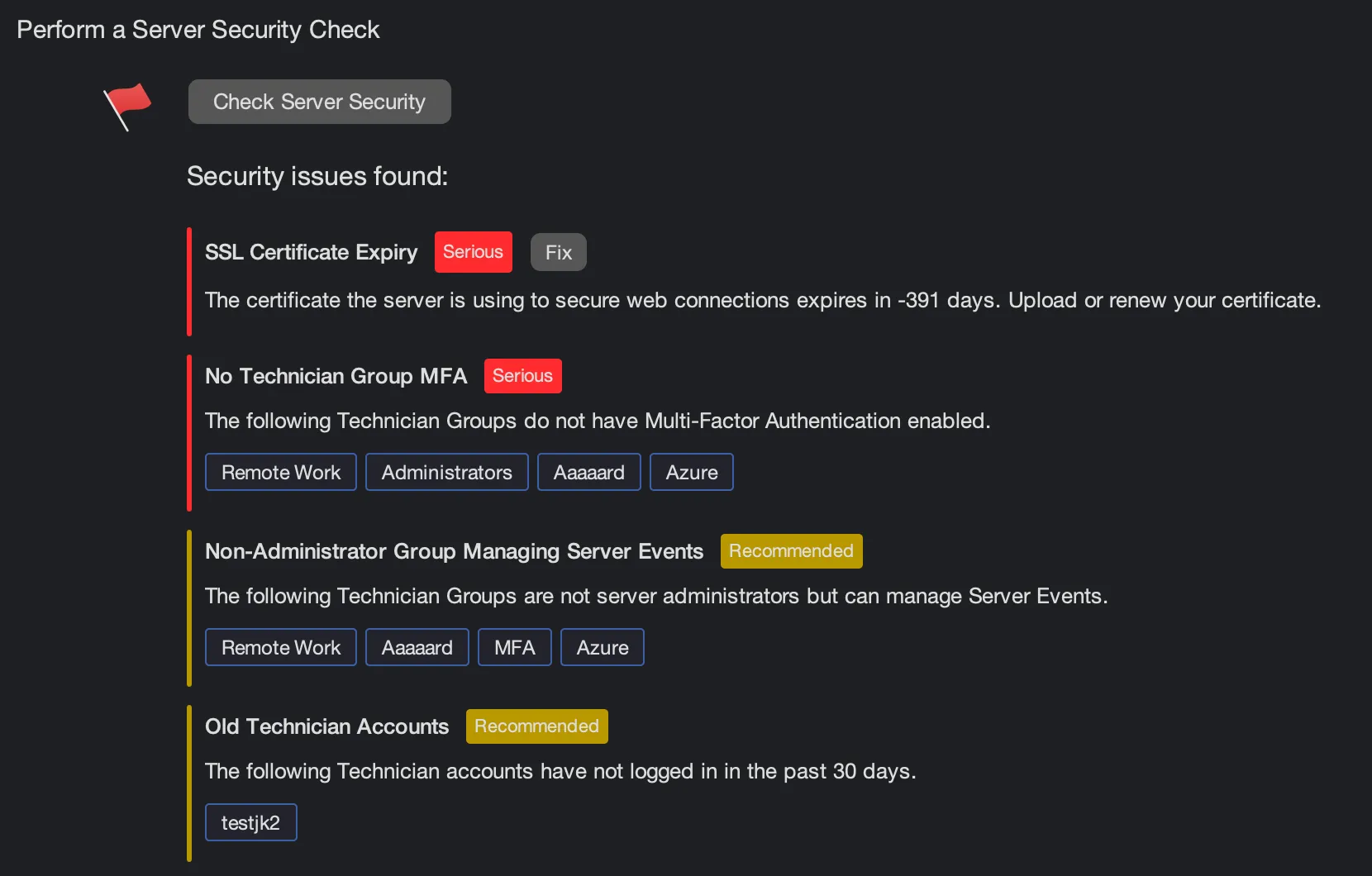
Security Audit
Perform a Security Audit of the settings for your SimpleHelp server. Access the audit in Administration > Server Health.
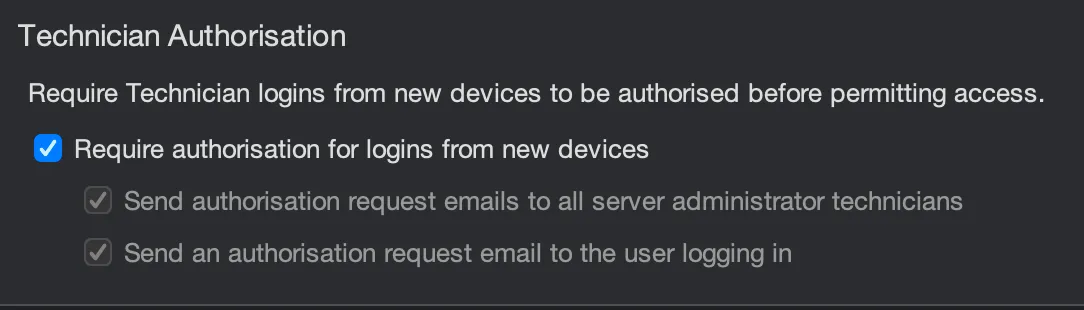
New Login Authorisation
Require authorisation for new Technician logins from unidentified devices. Server administrators will be notified of the new login, and options exist to email administrators and the user logging in for authorisation. Access this feature in Administration > Login Security. The list of devices a Technician has used can be seen by using the Show Devices action in Administration > Technicians.

Review Remote Access Services
New Remote Access Services that register with your SimpleHelp server will be placed in an Awaiting Review group. Services can only be connected to once approved. Access this feature in Administration > Remote Access Services.
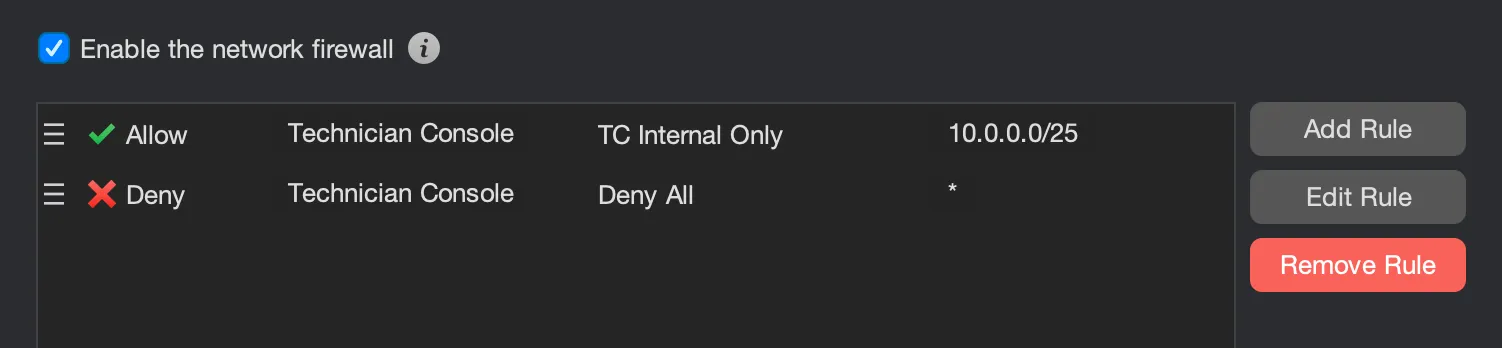
Application Firewall
SimpleHelp 6.0 includes a built-in application-level firewall that provides more fine-grained control over what types of incoming connections should be accepted by the server. This can be enabled in Administration > Firewall.

Password Complexity
Set and enforce password complexity requirements for local account logins. This can be enabled in Administration > Login Security and configured on a per-group level in Administration > Groups > Authentication. Administrators can also force a technician to reset their password by using the Force Password Reset action on the account.
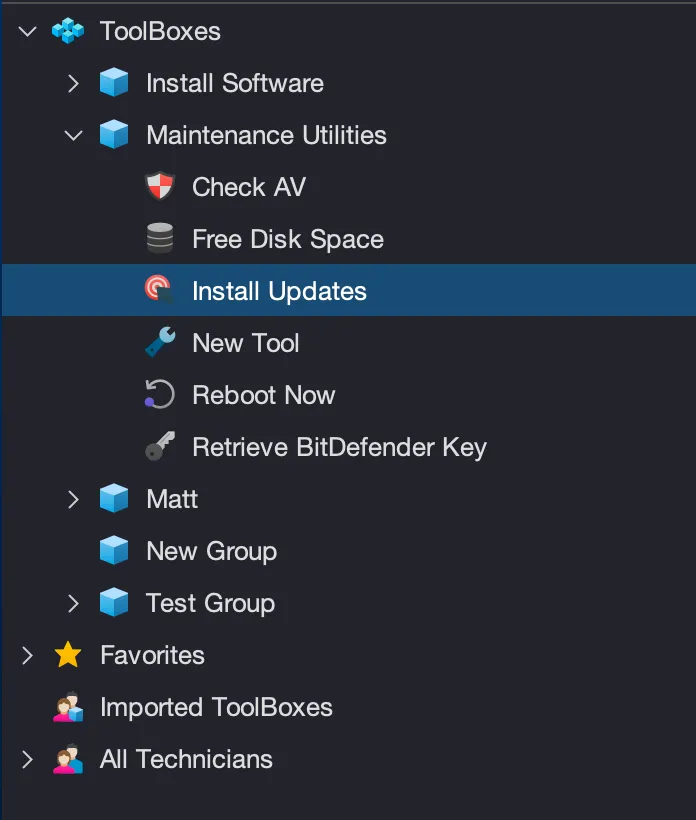
ToolBox Improvements
Tools can now be managed using a group hierarchy which supports:
- Dragging tools from one group to another.
- Sharing tools with other technicians, with read or read-write access.
- Favourite Tools that are easily run on remote machines using a shortcut launcher.
- Administrators can now manage the tools of other Technicians.
- A new shortcut allows a tool to easily be re-run.
- Tool executions appear in the History tab, alongside session history events.
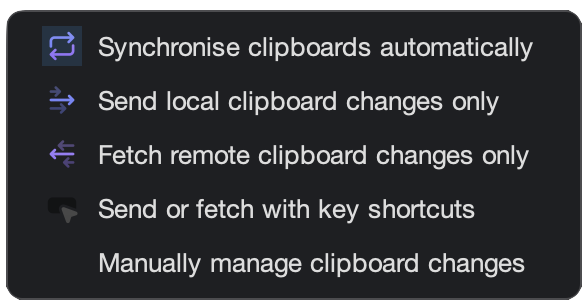
Clipboard Synchronisation
Sessions can now monitor and react to clipboard changes, and technicians can decide how they want clipboard contents to synchronise.
Additional Features and Improvements
Cyana AI Assistant
- Added Cyana, an AI assistant integrated into the Technician Console and session workflows.
- Added support for configuring multiple AI providers, including OpenAI, Azure OpenAI, Anthropic, Google Gemini, Mistral, Cohere, and other OpenAI-compatible providers.
- Added AI-assisted toolbox script generation with follow-up questions and review workflows.
- Added Cyana conversation PDF export.
- Added Cyana session history in the History tab.
- Added tools to allow Cyana to query machine information, fetch screenshots, manage files, execute commands and scripts, manage tags and perform web research.
- Added multi-machine AI workflows for supported actions across selected machines.
- Added Cyana response rendering for Markdown, tables, code blocks, HTML snippets, SVG, and light/dark themes.
- Added administrator controls, fine grained permissions, and review prompts for higher-risk actions.
Technician Console And Administration
- Updated with refreshed logos and visual design.
- Added a new Security Audit section in the Administration tab that analyses the server configuration, highlights risky settings, and suggests changes to improve security.
- Added server-wide and group-specific password strength requirements so administrators can choose how strict technician passwords must be.
- Added password reset requests, and automated reset requirements for weaker password.
- Added configurable password strength levels for specific groups.
- Added blocked login management for reviewing and managing blocked login attempts, including clearer visibility when users or addresses are blocked after repeated failures.
- Added technician authorisation controls so servers can require that technician access from a new device requires manual approval.
- Added administrator authorisation and email-based authorisation for new users.
- Added machine review workflows so administrators can review and approve newly registered Remote Access services before they become generally available.
- Added firewall administration for ordered
ALLOWandDENYrules, making it easier to control which connections and product functions are permitted. - Added failover URL configuration so administrators can publish an alternate URL for clients to use when a primary server is unavailable.
- Added a new Enterprise row and moved peering into its own administration section so enterprise-only configuration is easier to find.
- Removed the built in SimpleHelpAdmin user and group. On migration, an existing SimpleHelpAdmin user is migrated to a standard technician account and the Security Audit recommended that this account is removed or disabled.
- Added reorderable and configurable Access tab columns so technicians can tailor the machine list to the information they use most.
- Added richer monitoring hardware data, including GPU and Wi-Fi information.
- Made group labels clickable so users can navigate to parent groups directly from machine and access views.
- Improved the Access tab network interface display so network details are easier to read from the machine details panel.
- Added an option to minimise the Access details panel, giving technicians more space for the machine list when needed.
- Added helpful actions to empty panels so users are guided toward the next step instead of seeing an empty state.
- Improved group administration with a table of member technicians, making group membership easier to review.
- Improved IP restrictions with descriptions and a cleaner configuration UI, making rules easier to understand and maintain.
- Moved group authentication controls into the group configuration area.
- Removed the old visual distinction of group-authenticated users to simplify user management.
- Improved the technician configuration panel with a cleaner layout and side actions for common account operations.
- Added the ability to view which devices a technician has connected from.
- Added authentication-service tables showing whether each service is enabled for a technician group.
- Improved History panel session-type filtering so support, access, Remote Work, and other session types can be reviewed more easily.
- Replaced generic technician avatar images with coloured initials.
- Added a default connection mode setting and a permission controlling what happens when a technician clicks
Connect.
Toolboxes and Tools
- Rebuilt the Toolbox experience around a clearer tree-like layout for toolboxes and tools.
- Added toolbox favourites for commonly used tools and a favourite list to easily run tools on machines.
- Added shared toolboxes with read/write sharing controls.
- Added administrator visibility into other users's toolboxes.
- Added easier toolbox rename and move operations.
- Added architecture and bitness detection for tools.
- Added toolbox runs and results to the History tab.
- Added support for quickly rerunning tools.
- Added a separate searchable output window for tool run output.
- Added AI-assisted script generation and review.
- Added PowerShell syntax highlighting.
- Added portable Groovy script tool support.
- Improved toolbox import and export flows.
- Improved toolbox resource synchronisation and resource downloads.
- Improved shared-toolbox display, permissions, drag/drop, scrolling, and editor state.
Remote Access, Sessions, And WebTech
- Added browser desktop controls for multi-monitor selection, zooming, panning, minimap navigation, edge scrolling, and inertial panning.
- Added clearer WebTech authorisation emails, including browser information.
- Added clipboard synchronisation controls so users can choose how and when clipboards are synced.
- Added automatic clipboard change detection.
- Added support for popping the chat panel into its own window.
- Added silent reconnect improvements, including better support for reconnects after reboot.
- Added a new Remote Support Wizard so users receive clearer guidance while launching apps, starting the elevation helper, and configuring macOS permissions.
- Improved session cleanup, reconnect handling, failed-session cleanup, and duplicate-session display.
- Improved terminal input and file-transfer path handling.
- Improved support for local and remote folder memory in file transfer.
- Improved browser session behaviour on touch devices, iOS, and Safari.
- Improved browser-side click alignment, scrolling, multi-monitor switching, and screen chunk handling.
Screen Capture And Platform Support
- Added support for batched screen content fetching for better efficiency.
- Added support for Windows Server 2025, macOS Golden Gate.
- Improved Wayland capture support on Linux.
- Improved Remote Access session startup time.
- Improved multi-monitor and HiDPI behaviour across Windows, macOS, and Linux.
- Improved screen scaling, cursor capture, screen update handling, and first-frame capture.
- Improved Windows colour cursor capture, standard cursor support, scaling behaviour, Windows 7 capture, and terminal behaviour.
- Improved Linux process name capture in the Top Processes listing.
- Fixed macOS resolution-change, keyboard input, and shared-folder permission issues.
Security, Authentication, And Authorisation
- Added server-side Security Audit in the Administration tab, with automated audits and technician notification of issues.
- Added severity-based recommendations for security settings.
- Added
Fixactions for selected audit items that take administrators directly to the relevant configuration page. - Added checks for SSL, MFA, inactivity timeouts, unused technician accounts, weak passwords, API token IP restrictions, failed-login controls, protocols, and ciphers.
- Added an option to force technicians to reset passwords on next login.
- Improved password hashing and upgrade handling for older passwords.
- Added first-login user creation now that the old SimpleHelpAdmin path has been removed.
- Added Server Manager,
admin.shandadmin.batoptions to produce a one-time user password or temporary account. - The server will now notify administrators of potential issues:
- Added critical-notification emails to administrators by default, with preference control.
- Added new-version-available notifications.
- Added disk-space monitoring if the server is running low on disk space.
- Added fault logging and runtime/error log hooks so that remote applications can notify the server if they are failing for any reason.
- Added alerts if critical errors are found during a scheduled Security Audit.
- Added a new Server Log view for reviewing access, web, firewall, error, and other server-side logs from one place.
- Improved OIDC, Entra, LDAP, and RADIUS authentication flows (also present in 5.5.16).
- Improved OIDC matching, duplicate authentication ID handling, and email verification handling (also present in 5.5.16).
- Improved LDAP cache behaviour so that failed logins will not fail multiple times in the directory.
- Improved MFA flows and login-state reporting, including entries in a new Authentication log.
- Various SSL / TLS changes:
- Improved SSL configuration by centrally classifying weak and recommended ciphers and protocols.
- Added a single action to apply recommended SSL cipher/protocol settings.
- Added an option to load certificates from a Windows local certificate store.
- Added support for self-signed root certificates on Windows.
- Strengthened authorisation, session-token validation, cookie handling, and access checks across the product.
Firewall
- Added a dedicated Firewall in the Administration tab.
- Added ordered
ALLOWandDENYrules. - Added rules for any connection, TCP/UDP protocols, and specific SimpleHelp functions such as technician and access connections.
- Improved firewall-related logging and diagnostics in a dedicated Firewall log.
Web Server
- Added public authorisation result pages and OAuth/OIDC error pages.
- Added language selectors with flags, translated HTML pages.
- Added the ability to specify a
robots.txt. - Improved public/download pages and branding.
Remote Work
- Reworked Remote Work registration around endpoint/site tokens.
- Added one-use setup grants for Remote Work setup.
- Improved setup-token and site-token handling.
- Improved Remote Work table layout and logging.
- Fixed Remote Work setup, login, display, and license edge cases.
Updates, Installation, And App Startup
- Added signed server patch support, with administrator review and approval.
- Added FIPS-related compliance support.
- Improved update and download messaging shown to customers.
- Improved app startup and update reliability.
- Improved the updater's resilliance to updates being blocked by endpoint security.
- Improved upgrade logging and install-directory cleanup.
- Improved legacy installation and upgrade flows.
- Improved server restart reliability.
- Fixed a timestamp certificate issue that may cause Windows 7 services to fail to update.
- Fixed Windows version information on bundled executables.
- Fixed DMG icon embedding on macOS.
- Improved cleanup of older application bundles and versions.
- Added the ability to remove legacy installations of application bundles automatically.
Monitoring, Alerts, And Reporting
- Added an initial configuration dialog for alert creation.
- Added AI and toolbox summaries to session history.
- Added toolbox return codes to history and reporting surfaces.
- Added clearer session-type filters and Remote Work counts.
- Added configurable report columns.
- Improved alert saving and email batching.
- Improved SSL warning emails and notification delivery.
- Improved disk space reports:
- Reports now stream updates to the technician and update immediately during the scan.
- Items are categorised by the percentage usage of their parent.
Removed Or Changed
- Removed the legacy Group Access and Presentation applications.
- Removed the old SimpleHelpAdmin administration path from normal login workflows.
- Removed Linux 32-bit Wayland support.
General Reliability Fixes
- Fixed a range of WebTech session issues, including network timeouts, screen gaps, poor rendering, zoomed click alignment, scroll boundaries, and stale failed-session state.
- Fixed screen capture issues across Windows, macOS, and Linux.
- Fixed multiple authentication, MFA, OIDC, LDAP, RADIUS, and login-blocking edge cases.
- Fixed toolbox import, sharing, permissions, resource, and editor issues.
- Fixed alert, email, report, monitoring, and session-history issues.
- Fixed upgrade, installation, restart, and bundled app packaging issues.
- Fixed registry handling after expanded failure-path testing.
Upgrade Notes
- SimpleHelp 6.0 is a major upgrade from 5.5.
- Administrators should review Cyana AI settings, Security Audit results, SSL settings, password policy, firewall rules, Remote Work configuration, machine approval queues, patch approval settings, and notification preferences after upgrading.
- Technicians should expect a refreshed console, new Cyana features, improved toolbox workflows, browser session improvements, clearer session state, and additional prompts where new security or authorisation policies apply.


